Diagnosing and Replacing a Failed Fuse in the 24V DC Power Distribution System #
Overview #
The OctoPlex 24V DC Power Distribution System provides intelligent monitoring and protection for many of the vessel’s critical DC electrical circuits.
When a connected device or system is not operating, one possible cause may be a failed fuse within the OctoPlex DC Power Distribution Unit. This article provides a basic troubleshooting process to identify a non-operating DC circuit caused by fuse failure and outlines the proper replacement procedure.
Before replacing any fuse, the cause of the failure should be investigated. A blown fuse is often an indication of an electrical overload, short circuit, or equipment fault.
Safety Precautions #
WARNING – DC ELECTRICAL SYSTEM
Before servicing the OctoPlex DC Power Distribution Unit:
- Ensure proper electrical safety procedures are followed.
- Identify the affected circuit before removing components.
- Disconnect power when required.
- Use only the correct replacement fuse rating.
- Never install a fuse with a higher amperage rating.
Installing an incorrect fuse may result in equipment damage or create a potential fire hazard.
Common Symptoms of a Failed Fuse #
A failed fuse may present as:
- Individual equipment not powering on.
- DC circuit unavailable through OctoPlex controls.
- Loss of power to a specific onboard system.
- No response from a connected device.
- Circuit fault indication within the OctoPlex monitoring system.
Initial Troubleshooting #
Before replacing the fuse, verify:
1. Confirm the Circuit Condition #
Check:
- Is the affected equipment receiving power?
- Is the circuit enabled through the OctoPlex display?
- Are there active alarms or fault messages?
2. Verify the OctoPlex System Status #
Confirm:
- DC distribution unit is powered.
- Network communication is active.
- No system-wide DC faults are present.
3. Identify the Correct Circuit #
Using the OctoPlex system information:
- Locate the affected load.
- Identify the corresponding fuse position.
- Confirm the circuit designation before removal.
Fuse Inspection Procedure #
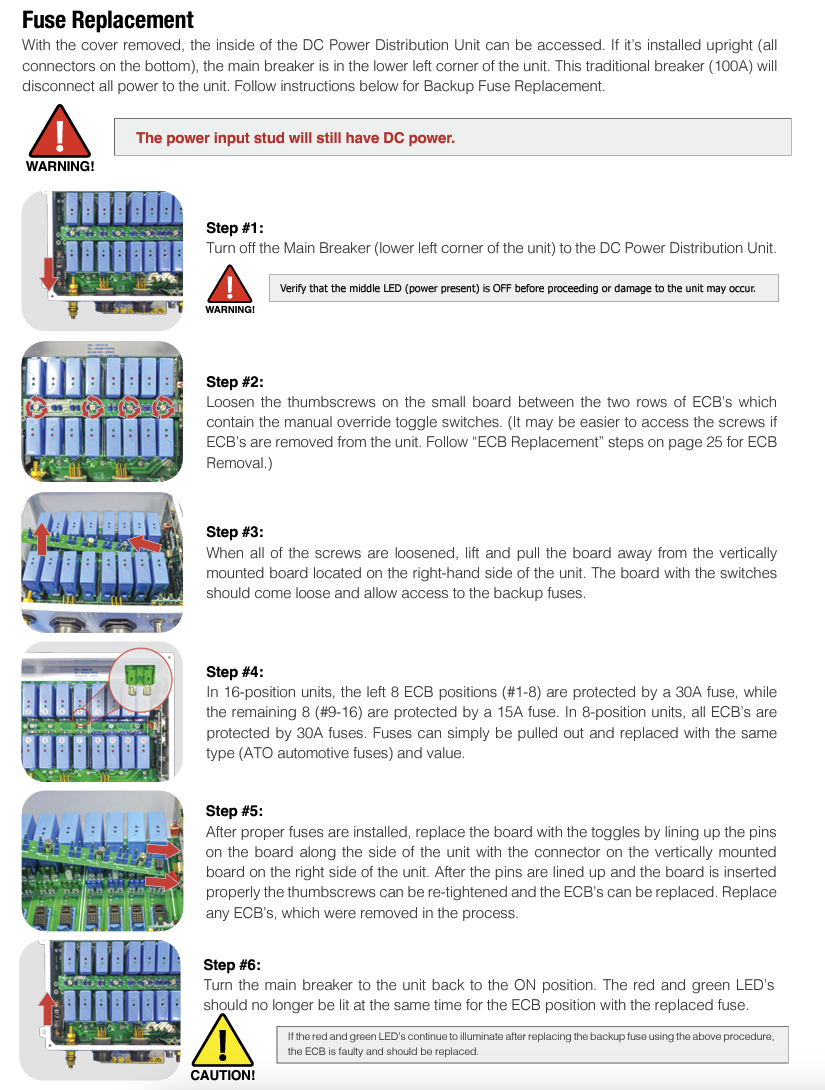
Step 1 – Access the DC Distribution Unit #
- Open the OctoPlex DC Power Distribution enclosure.
- Locate the fuse distribution section.
- Identify the fuse associated with the non-operating circuit.
Step 2 – Inspect the Fuse #
Remove the fuse and inspect for:
- Broken fuse element.
- Visible damage.
- Discoloration.
- Signs of overheating.
If available, verify fuse continuity using an appropriate meter.
Fuse Replacement Procedure #
Step 1 – Remove Failed Fuse #
- Confirm the correct fuse location.
- Remove the failed fuse using appropriate tools.
- Inspect the fuse holder for:
- Corrosion.
- Heat damage.
- Loose connections.
Step 2 – Install Replacement Fuse #
- Install a replacement fuse of the same type and amperage rating.
- Ensure the fuse is fully seated.
- Confirm proper contact within the fuse holder.
Step 3 – Restore Power and Verify Operation #
After replacement:
- Restore DC power if removed.
- Activate the circuit through the OctoPlex system.
- Verify the connected equipment operates normally.
- Confirm no faults or alarms remain.
If the Fuse Fails Again #
If the replacement fuse immediately fails:
Do not continue replacing fuses.
Investigate for:
- Short circuits.
- Damaged wiring.
- Faulty equipment.
- Excessive electrical load.
- Incorrect circuit configuration.
Repeated fuse failures indicate an underlying electrical issue that should be diagnosed before returning the circuit to service.
Preventative Maintenance Recommendations #
To maintain reliable OctoPlex DC operation:
- Inspect DC distribution components during routine service.
- Keep electrical connections clean and secure.
- Monitor recurring circuit faults.
- Maintain accurate circuit documentation.
- Use only approved replacement components.
Reference Documentation #
This article is intended as a supplemental Ocean Alexander Knowledge Base reference for diagnosing and replacing DC distribution fuses within the OctoPlex 24V DC Power Distribution System.
Always refer to the official OctoPlex documentation and vessel-specific electrical schematics before performing electrical repairs.
Need Assistance?
For technical support, warranty assistance, parts, or to schedule service:
Ocean Alexander Yacht Service
East Coast Yacht Group
2955 W State Road 84 Fort Lauderdale FL, 33312
954-530-2033
🌐
oayachtservice.com
Follow us for maintenance tips, technical updates, and service announcements:
Instagram
This article is part of the Ocean Alexander Yacht Service Knowledge Base. Information is provided for general guidance and should not replace the applicable Owner’s Manual or service procedures.
© Ocean Alexander Yacht Service – East Coast Yacht Group, Inc.


