Electronic Circuit Breaker (ECB) Replacement Procedure #
Overview #
The OctoPlex 24V DC Distribution System utilizes Electronic Circuit Breakers (ECBs) to provide intelligent protection and control of individual DC electrical loads throughout the vessel.
An ECB may require replacement if it becomes non-operational, fails to respond to commands, or exhibits abnormal fault behavior. The following procedure outlines the basic steps for safely removing and replacing an ECB within an OctoPlex DC Power Distribution Unit.
Before performing any service, ensure the cause of the breaker failure has been identified and corrected. Replacing a breaker without addressing an underlying electrical fault may result in repeated failure.
Safety Precautions #
WARNING – DC POWER IS PRESENT
Before beginning:
- Ensure the vessel electrical system is safe to service.
- Disconnect power to the OctoPlex DC Distribution Unit.
- Follow proper electrical safety procedures.
- Only qualified personnel should perform electrical service.
Important: The main DC input connection may remain energized even when individual ECB circuits are disabled.
Required Tools & Materials #
- Replacement OctoPlex Electronic Circuit Breaker (ECB).
- Appropriate hand tools.
- Personal protective equipment as required.
Verify the replacement ECB is the correct type and rating for the installed OctoPlex configuration.
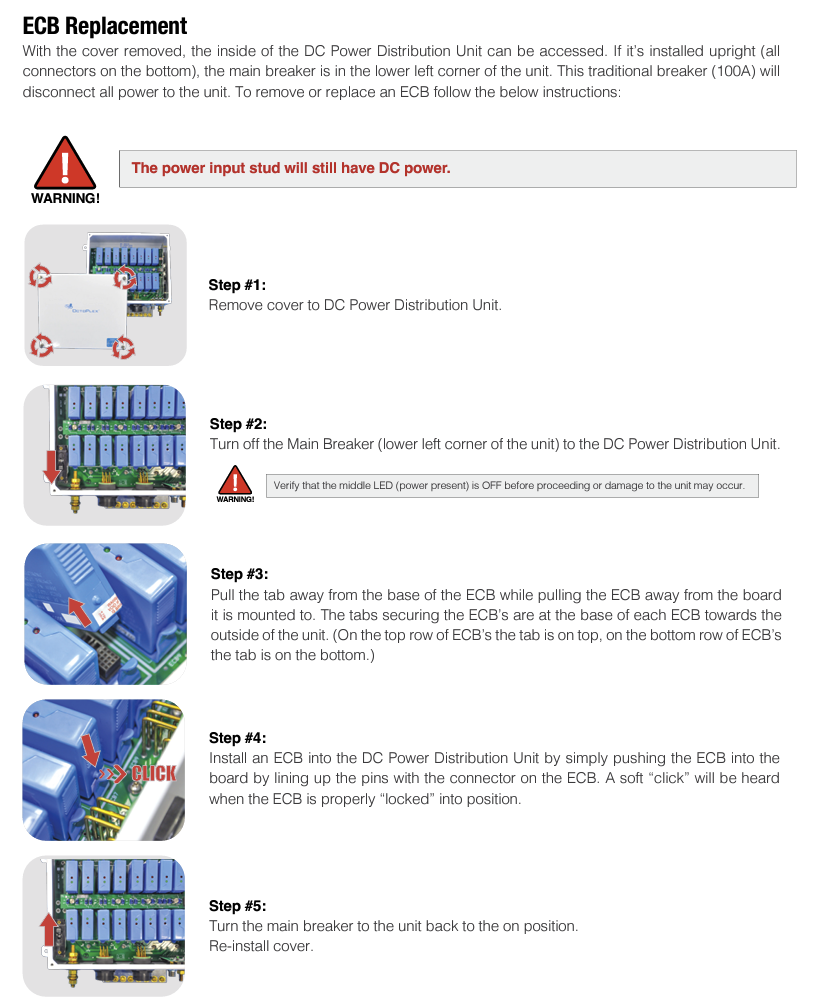
ECB Replacement Procedure #
Step 1 – Remove DC Distribution Unit Cover #
- Open access to the OctoPlex DC Power Distribution Unit.
- Remove the protective cover to access the electronic circuit breakers.
Step 2 – Disable Main Power #
- Locate the main breaker for the DC Power Distribution Unit.
- Turn the main breaker OFF.
- Verify the power-present indicator LED is OFF before continuing.
Do not proceed until power has been confirmed removed from the ECB assembly.
Step 3 – Remove Failed ECB #
To remove the defective electronic circuit breaker:
- Locate the failed ECB.
- Pull the locking tab away from the ECB base.
- While holding the tab, pull the ECB away from the circuit board connector.
ECB locking tab location:
- Top row ECBs: Locking tab is located on the top.
- Bottom row ECBs: Locking tab is located on the bottom.
The breaker should release from the board connector once the locking tab is disengaged.
Step 4 – Install Replacement ECB #
To install the replacement:
- Align the ECB pins with the corresponding connector.
- Press the ECB firmly into position.
- Confirm the breaker seats fully into the connector.
- Listen for the soft “click” indicating the ECB has locked into place.
Step 5 – Restore Power #
After installation:
- Verify the ECB is properly seated.
- Reinstall the DC distribution cover.
- Turn the main DC breaker back ON.
- Confirm normal OctoPlex operation.
Post-Replacement Verification #
After restoring power, verify:
- ECB is visible in the OctoPlex control system.
- Circuit can be commanded ON/OFF.
- No breaker faults are displayed.
- Connected equipment operates normally.
- No abnormal alarms are present.
Troubleshooting After Replacement #
If the replacement ECB does not operate:
Check:
- Correct ECB part installed.
- ECB is fully seated.
- DC power is available.
- OctoPlex network communication is active.
- Load wiring is secure.
- Connected equipment does not contain a short circuit or overload condition.
Repeated ECB failures should be investigated before installing additional replacement breakers.
Owner & Crew Reminder #
OctoPlex Electronic Circuit Breakers provide both circuit protection and intelligent monitoring within the vessel’s DC distribution system. Proper troubleshooting and replacement procedures help maintain reliable operation of onboard electrical systems.
This guide is intended as a supplemental Ocean Alexander Knowledge Base reference and does not replace the official OctoPlex installation, operation, or service documentation.
Need Assistance?
For technical support, warranty assistance, parts, or to schedule service:
Ocean Alexander Yacht Service
East Coast Yacht Group
2955 W State Road 84 Fort Lauderdale FL, 33312
954-530-2033
🌐
oayachtservice.com
Follow us for maintenance tips, technical updates, and service announcements:
Instagram
This article is part of the Ocean Alexander Yacht Service Knowledge Base. Information is provided for general guidance and should not replace the applicable Owner’s Manual or service procedures.
© Ocean Alexander Yacht Service – East Coast Yacht Group, Inc.


