Overview #
The OctoPlex N2KView System provides vessel monitoring and control capabilities through an iPad interface, allowing crew to view critical vessel systems including electrical systems, tanks, engines, generators, and other NMEA 2000® connected devices.
The N2KView Mobile application communicates with the vessel’s monitoring system through the onboard network interface, providing a remote display of configured vessel data.
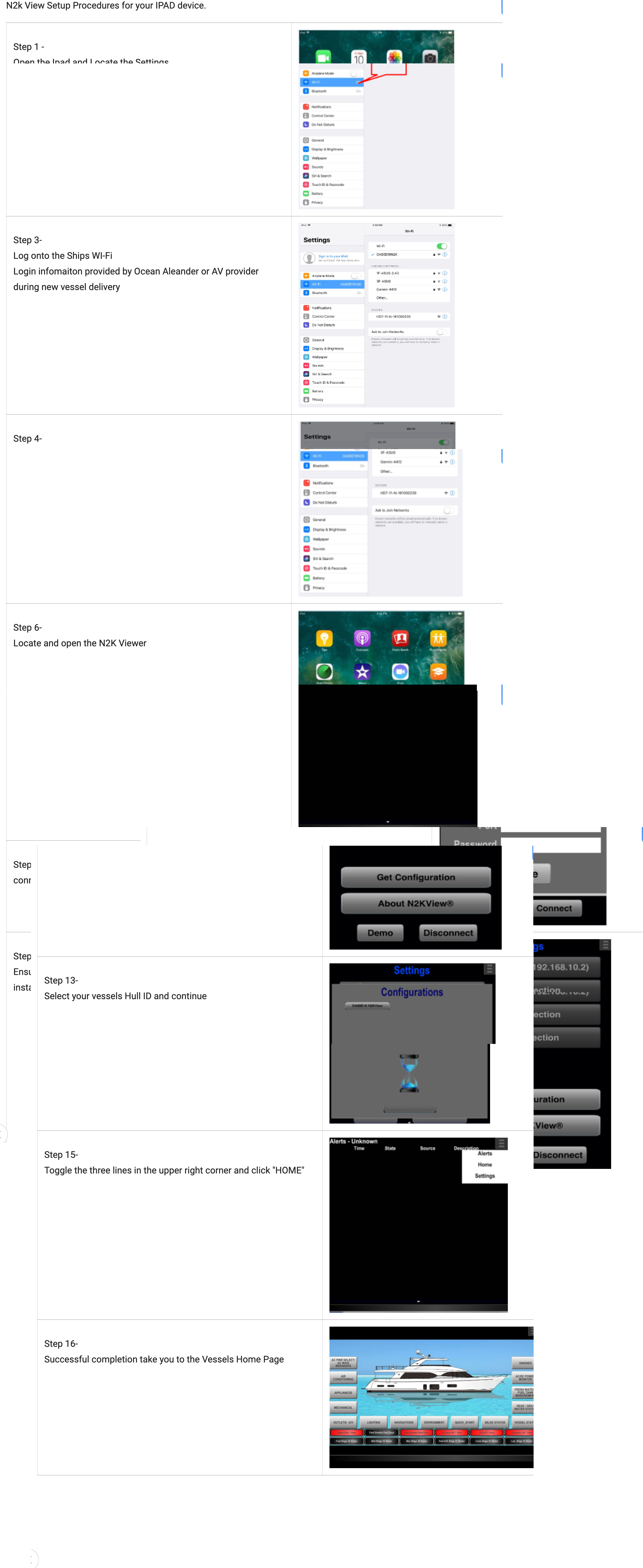
This guide provides a step-by-step overview for setting up and configuring N2KView on an iPad device for use onboard an Ocean Alexander yacht.
The following pages contain the detailed setup procedure and configuration instructions.
System Requirements #
Before beginning setup, confirm the following:
- iPad device is available and connected to the vessel network.
- N2KView Mobile application is installed.
- OctoPlex/NMEA 2000® network is powered and operational.
- Vessel gateway/interface is active.
- Network credentials and configuration information are available.
N2KView Mobile requires communication with the vessel’s NMEA 2000® monitoring network through the appropriate onboard interface.
Setup Procedure Overview #
The setup process includes:
- Installing N2KView Mobile on the iPad.
- Connecting the iPad to the vessel Wi-Fi network.
- Establishing communication with the onboard N2KView gateway.
- Downloading vessel configuration files.
- Verifying system data and controls.
- Confirming normal operation.
iPad Application Installation #
- Open the Apple App Store on the iPad.
- Search for:
N2KView Mobile
- Download and install the application.
- Open the application after installation.
N2KView Mobile is designed for iPad/iOS devices and provides access to vessel monitoring information from the onboard system.
Connecting the iPad to the Vessel Network #
Before opening N2KView:
- Open iPad Settings.
- Select Wi-Fi.
- Connect to the vessel’s onboard Wi-Fi network.
- Confirm the iPad receives a valid network connection.
The iPad must be connected to the same onboard network as the N2KView communication interface.
Initial N2KView Connection #
When opening N2KView for the first time:
- Launch the N2KView application.
- Navigate to the connection settings.
- Enter the required vessel network information.
- Connect to the onboard N2KView server/interface.
- Allow the application to establish communication.
Once connected, the application will begin receiving vessel data.
Configuration Download #
After the initial connection:
- Allow N2KView to download the vessel configuration.
- Wait for all configured screens and data points to populate.
- Verify that vessel information is displayed correctly.
The configuration determines which vessel systems and monitoring screens are available to the operator.
Verifying System Operation #
After setup is complete, verify:
Electrical Systems #
Confirm visibility of:
- AC power status.
- DC systems.
- Battery information.
- Breaker monitoring.
Tank Monitoring #
Verify:
- Fuel levels.
- Water levels.
- Waste tank levels.
- Sensor communication.
Machinery Monitoring #
Confirm available data such as:
- Engine information.
- Generator status.
- Alarms.
- Operating parameters.
Troubleshooting #
N2KView Will Not Connect #
Check:
- iPad is connected to vessel Wi-Fi.
- Vessel network is powered.
- N2KView gateway/interface is online.
- Correct connection settings are entered.
Missing Data or Incorrect Displays #
Verify:
- Network communication.
- Sensor operation.
- NMEA 2000® connections.
- Configuration file status.
Configuration Does Not Load #
Check:
- Network connection quality.
- N2KView server/interface operation.
- Correct vessel configuration availability.
Operational Notes #
The N2KView iPad interface should be considered a monitoring and control tool and does not replace required vessel watchkeeping practices or physical system inspections.
Crew should continue to verify critical systems through normal operational procedures.
Reference Documentation #
The attached PDF provides the complete:
OctoPlex N2KView Setup and Configuration Procedure
including:
- iPad connection steps.
- Network configuration.
- Screen setup.
- System verification.
- Troubleshooting procedures.
This guide is intended as a supplemental Ocean Alexander Knowledge Base reference and does not replace official OctoPlex, Maretron, or N2KView manufacturer documentation.
Need Assistance?
For technical support, warranty assistance, parts, or to schedule service:
Ocean Alexander Yacht Service
East Coast Yacht Group
2955 W State Road 84 Fort Lauderdale FL, 33312
954-530-2033
🌐
oayachtservice.com
Follow us for maintenance tips, technical updates, and service announcements:
Instagram
This article is part of the Ocean Alexander Yacht Service Knowledge Base. Information is provided for general guidance and should not replace the applicable Owner’s Manual or service procedures.
© Ocean Alexander Yacht Service – East Coast Yacht Group, Inc.


