Overview #
The Climma Marine HVAC Air Handler Control System provides operators with direct control over onboard climate settings, including temperature set points, fan speed, and operating modes.
The air handler interface allows crew and guests to adjust cabin comfort levels while monitoring system operation through a simple digital control display.
This article provides an overview of the primary functions available through the Climma HVAC Air Handler User Interface and explains how to adjust common operating parameters.
Climma Control Interface Functions #
The Climma controller provides access to the following primary functions:
- Temperature set point adjustment.
- Cooling operation.
- Heating operation (if equipped with reverse cycle).
- Automatic mode selection.
- Fan speed adjustment.
- System ON/OFF control.
- Status monitoring.
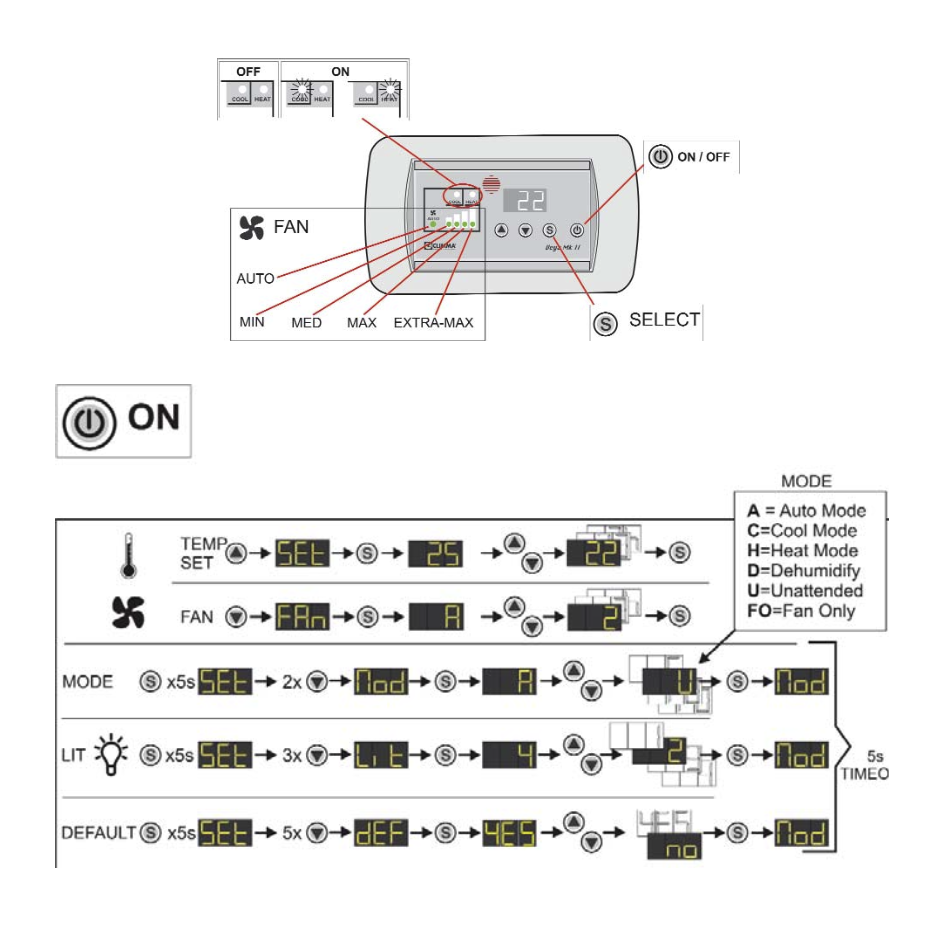
The following diagram illustrates the basic control functions and navigation of the Climma HVAC air handler interface.
Adjusting Temperature Set Point #
The temperature set point determines the desired cabin temperature maintained by the HVAC system.
To adjust the set point:
- Access the Climma control display.
- Use the temperature adjustment buttons to increase or decrease the desired temperature.
- Confirm the new set point is displayed.
- Allow the system time to reach the selected temperature.
For best performance, avoid frequent temperature adjustments, as large temperature changes may increase system operating time and reduce efficiency.
Selecting Operating Mode #
The Climma controller may include multiple operating modes depending on system configuration.
Common modes include:
COOL Mode #
Used for cooling interior spaces.
The system removes heat and humidity from the cabin air to maintain the selected temperature.
HEAT Mode #
Available on reverse-cycle systems.
The system transfers heat into the vessel interior during cooler conditions.
AUTO Mode #
Allows the system to automatically select heating or cooling operation to maintain the selected temperature.
OFF / Standby #
Turns the air handler operation off while maintaining controller power.
Adjusting Fan Speed #
Fan speed controls the amount of conditioned air delivered into the cabin.
Available settings may include:
- Low speed.
- Medium speed.
- High speed.
- Automatic fan control.
Recommended Operation: #
Use AUTO Fan Speed when available for the most efficient operation. The system will automatically adjust airflow based on the cabin temperature demand.
Increase fan speed when:
- Rapid cooling is required.
- Cabin temperature changes quickly.
- Airflow appears insufficient.
System Operation Tips #
For optimal HVAC performance:
- Keep air return grills unobstructed.
- Maintain clean air filters.
- Avoid closing too many supply vents.
- Allow adequate operating time for humidity removal.
- Verify proper seawater flow if cooling performance decreases.
Crew Familiarization #
All crew members responsible for vessel operation should become familiar with:
- Climma controller navigation.
- Changing operating modes.
- Adjusting temperature settings.
- Selecting fan speeds.
- Recognizing basic system indicators and alarms.
Proper understanding of the HVAC interface helps maintain onboard comfort and allows operators to quickly identify abnormal operation.
Reference Diagram #
The following diagram demonstrates the primary functions of the Climma HVAC Air Handler User Interface, including:
- Temperature set point adjustment.
- Fan speed selection.
- Mode selection.
- System operation controls.
This guide is intended as a supplemental Ocean Alexander reference and does not replace the official Climma HVAC operating documentation.
Need Assistance?
For technical support, warranty assistance, parts, or to schedule service:
Ocean Alexander Yacht Service
East Coast Yacht Group
2955 W State Road 84 Fort Lauderdale FL, 33312
954-530-2033
🌐
oayachtservice.com
Follow us for maintenance tips, technical updates, and service announcements:
Instagram
This article is part of the Ocean Alexander Yacht Service Knowledge Base. Information is provided for general guidance and should not replace the applicable Owner’s Manual or service procedures.
© Ocean Alexander Yacht Service – East Coast Yacht Group, Inc.


